

UPDATE: AI moves fast so here are a couple of improvements included in the templates
Email newsletters - you can now add your newsletters to your reading list by tagging them. They get downloaded, summarised and add to your list daily ready to be read at a more convenient time.
Notion 3.0 - the Notion AI template includes more AI features. You can also ask it to research books on Goodreads (but can’t trigger the AI to search the web when the page is added like with n8n).
Pocket has run out of things to save, primarily, itself.
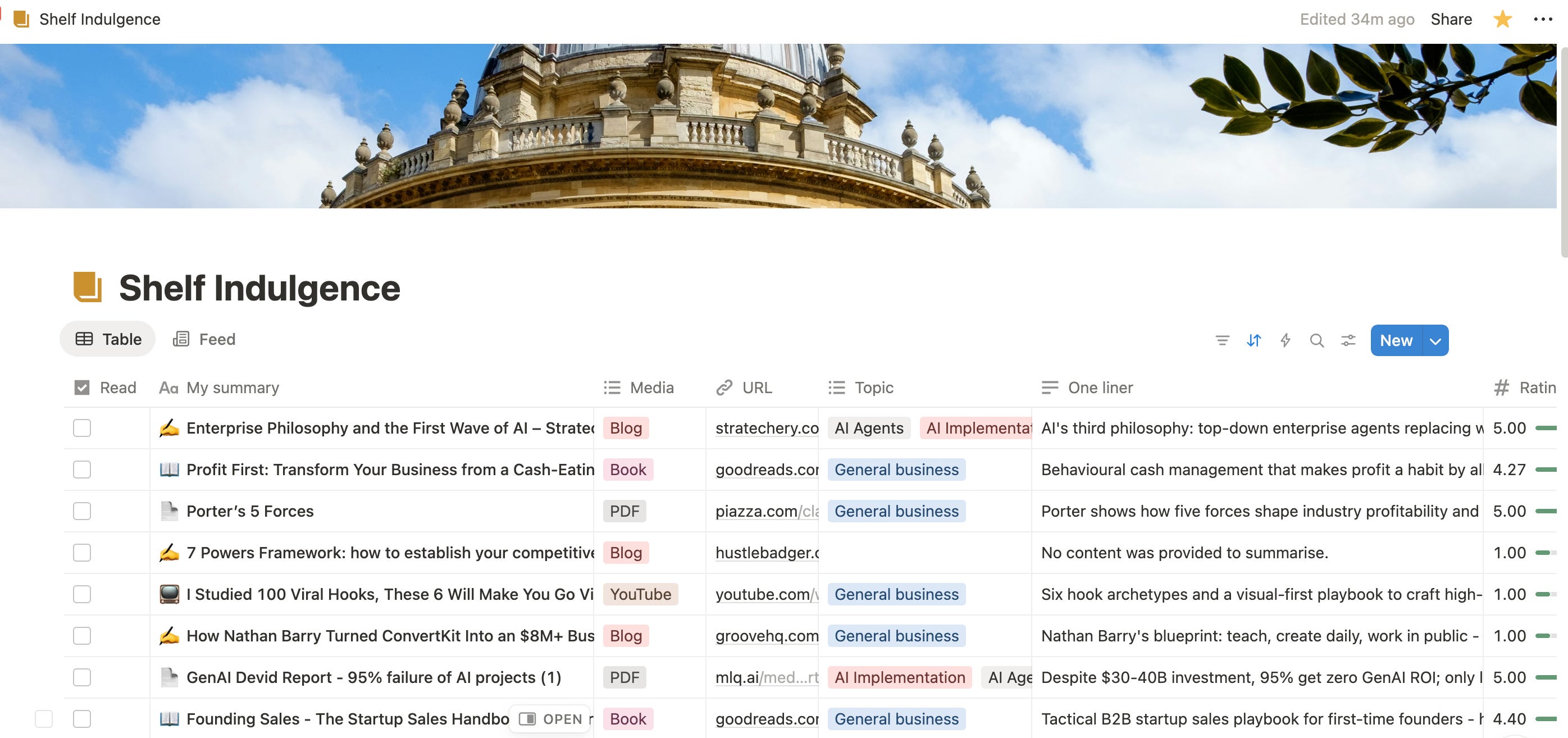
So since Pocket shut down, I’ve built my own reading list app that saves and summarises blogs, YouTube, PDFs, and even books.
I treated Pocket as my junk drawer for blog articles. Anything Present Me didn’t have time for got passed to Future Me, a person with abundant time and attention.
This kept Present Me focused on the present. Future Me inherited the problem and dealt with it in the same way as the junk drawer - by ignoring it.
My Pocket replacement does even more than the original:
🌍 Captures everything: Saves articles on mobile or browser with a click
📚 Multi-media: Works for YouTube, PDFs, blogs and even books
📝 Summarises: Quotes, key points, categorisation, reviews and overview
I’m sharing two different versions depending on your technical ability:
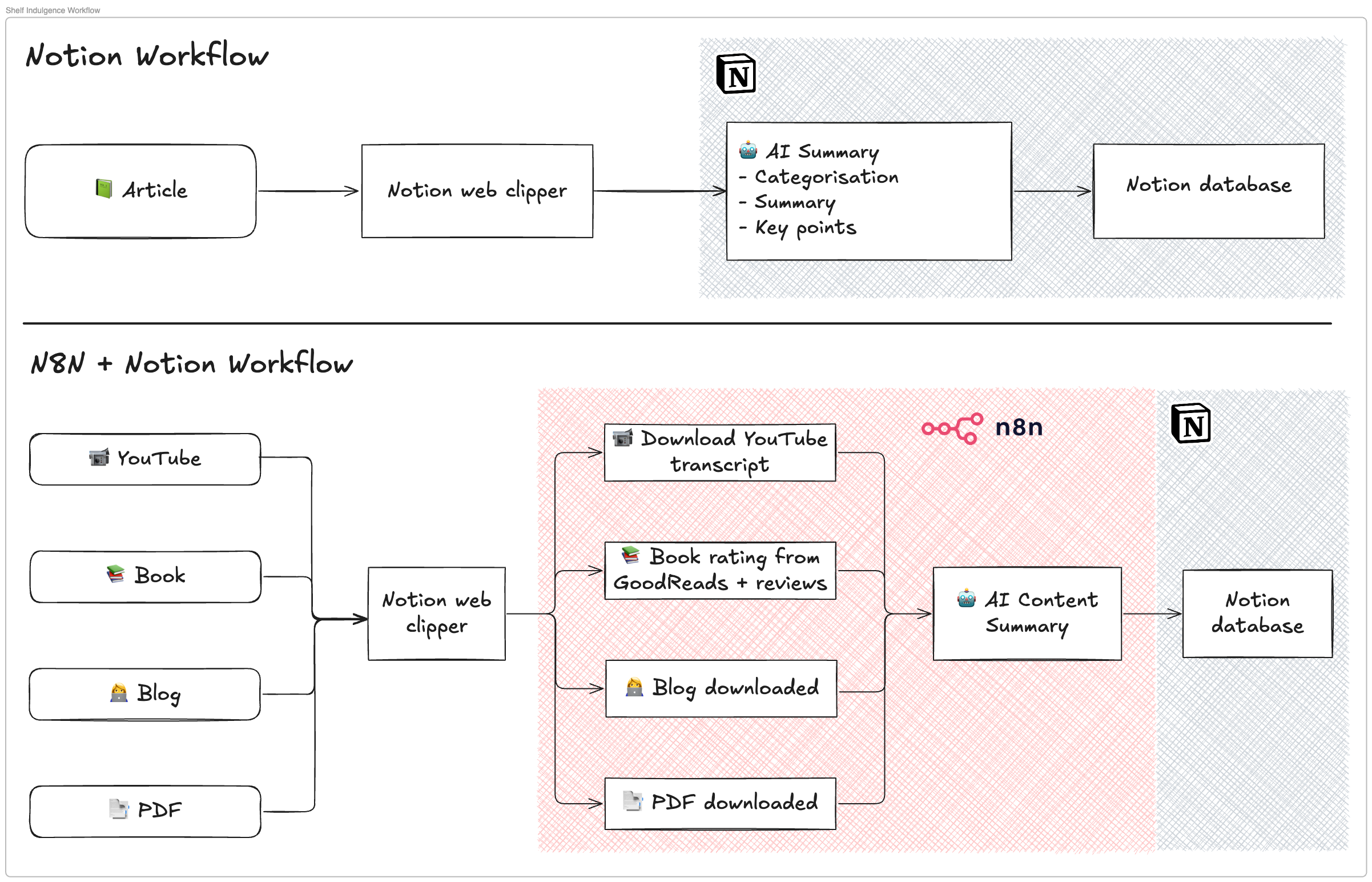
🗄️ A Notion template — Two minute set-up, captures everything, summarises, but can’t digest YouTube, books, or PDFs
🤖 N8N workflow + Notion — 15 minute set-up (need a couple of API accounts), summarises anything, better reading list experience than Pocket.
Here’s an overview of how to set-up your own version
Option 1: Simple Notion + AI Database
Spice level: 🍋🌿 Lemon and herb
Requirements: Notion + AI add-on
Template: Copy to your Notion workspace
Walkthrough of features and setup

Summary of workflow
You clip an article with the Notion Web Clipper (or share to the Notion database when on mobile), and this adds it to your reading list. Future You will find the article waiting, including the full-text you can read offline — a feature Pocket made you pay for.
Each item comes pre-digested using Notion AI:
One-liner: the gist in a sentence
Paragraph summary: a quick read if you’ve got a minute
Key points & quotes: distilled insights, but with the author’s words intact. I prefer pulling out quotes rather than letting AI paraphrase everything. It keeps the meaning sharper, and the language closer to the source.
Once you’ve got a few articles in your list, you can switch between different views:
Feed view: skim the opening of each article like a newsreader
Table view: organise by topic, date, or priority
Set-up takes two minutes. All you need is Notion and the AI add-on enabled. After that, just duplicate the template, choose where to store it, and start saving.
If you want the “lemon and herb” version of a Pocket replacement, this is it.
Option 2: Spicy Notion + n8n Auto Summary Workflow
Spice level: 🌶️ Peri-peri hot
Requirements: Notion (no AI) + N8N + API keys (OpenAI, YouTube Transcripts)
Templates:
Walkthrough of features and setup

Summary of workflow
This is the full-spice version, a full Pocket replacement that goes beyond articles. With N8N augmenting a Notion database, you can capture, summarise, and organise:
Blogs: Full-text capture, summarised automatically
YouTube: Transcript pulled in, key points extracted
PDFs: Text extracted and digested into summaries + quotes
Books: Reviews and ratings fetched from Goodreads, distilled into highlights
NEW Gmail: Stores & summarises email newsletters labelled in your inbox
Like the Notion template, everything gets broken down pyramid-style: one-liner → paragraph → key points with quotes.
How it works
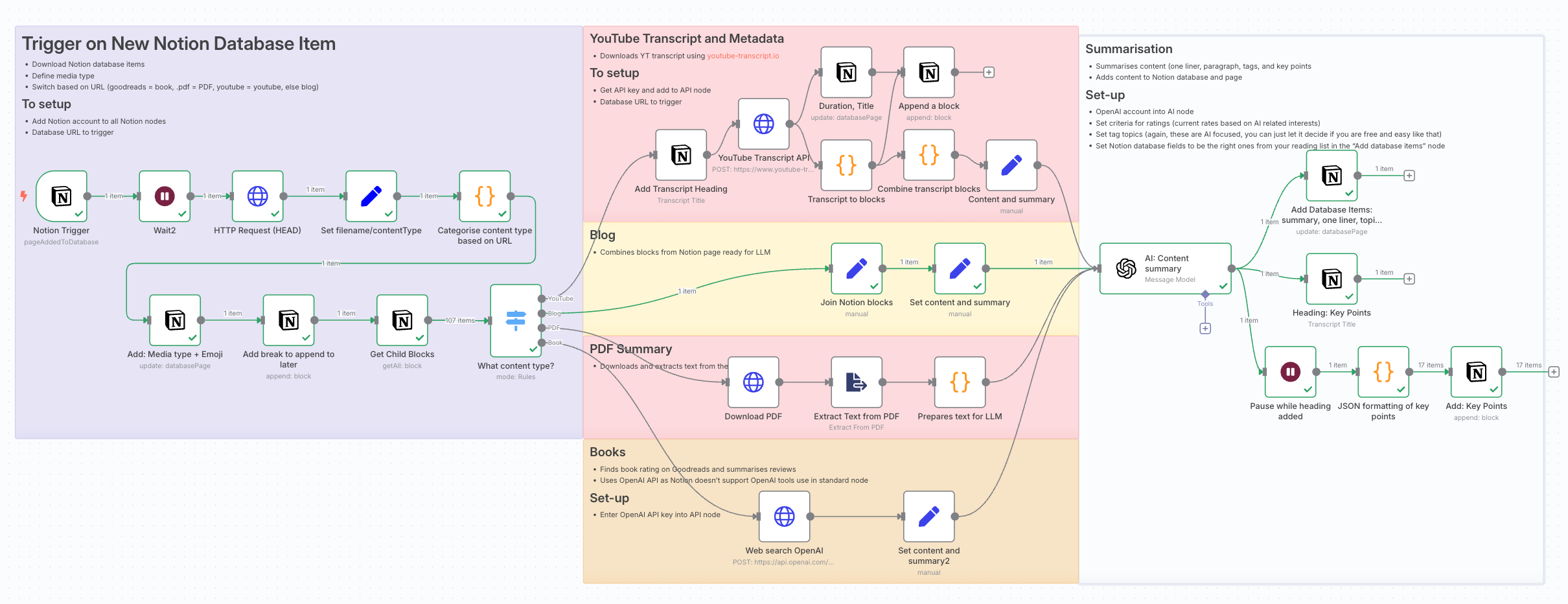
You clip content into Notion with the Web Clipper (or share from mobile to Notion). That’s the trigger. From there, N8N takes over:
Detects the media type (blog, PDF, YouTube, book)
Runs the right workflow (extract text, fetch transcript, pull metadata, etc.)
Sends it to AI for summarisation + formatting
Adds it back to your Notion reading list
The configuration is straightforward:
Upload the provided N8N workflow JSON and duplicate the Notion template
Follow instructions in N8N template to
Add Notion database to Notion trigger node
Connect your API accounts (OpenAI, YouTube Transcripts)
Adjust the summarisation prompt if you prefer different outputs (e.g. ratings, categories, longer digests)
Once it’s live, you’ll have a single database that handles everything from PDFs to YouTube lectures — all stripped down to digestible notes.